Zombie Fire 3D: Offline Game
- 4.6
- Rating
- 10.00M
- Installs
- Free
- Price
 Analysis by App-foxy
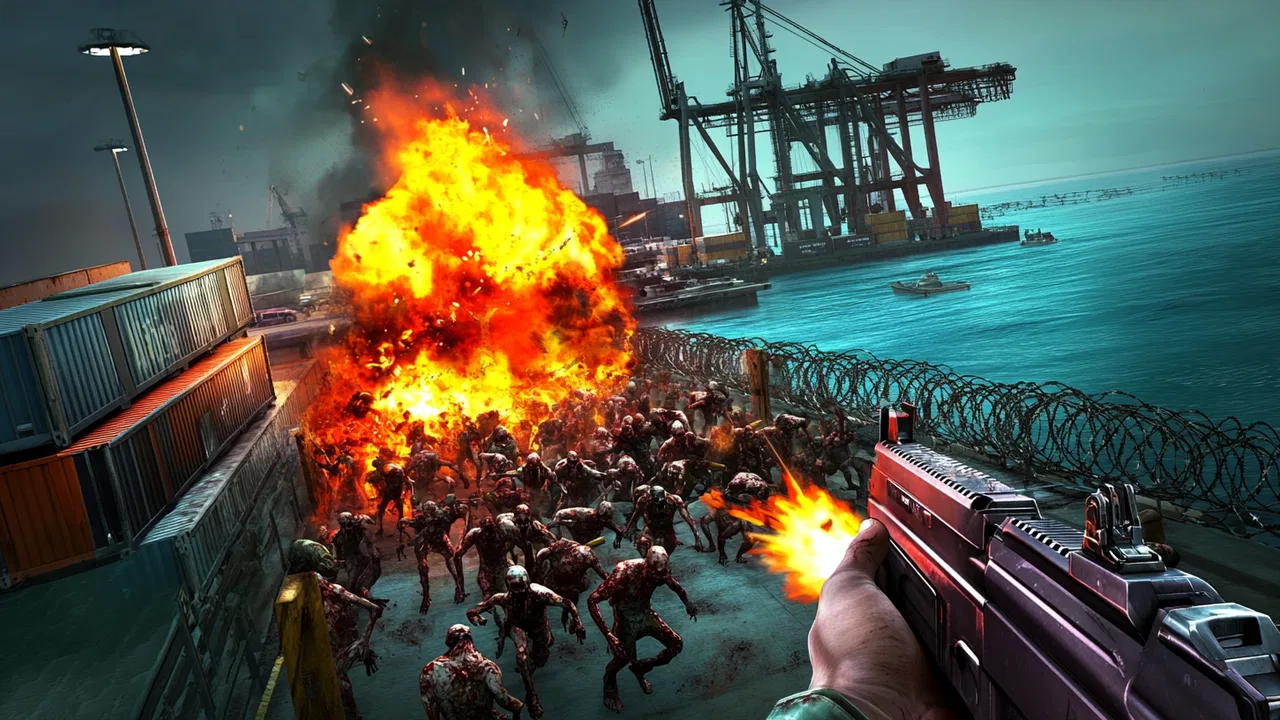
I spent time with Zombie Fire 3D: Offline Game as a quick-action shooter and as the sort of title that might end up on a shared household phone. Its appeal is easy to understand: pick it up, face a zombie threat, and focus on shooting rather than learning a complicated strategy system. That directness makes it suitable for short sessions, but the Mature 17+ rating also changes how I would recommend it around a family device. It is free to start, although optional purchases range from $0.99 to $99.99 per item, so the person installing it should think about both the audience and the account being used.
How the game feels in ordinary use
The first thing I noticed is how quickly the game gets to its central activity. This is an action game from VNGGames Studios, built around surviving a zombie outbreak with a firearm in hand. It does not ask me to spend a long time arranging a settlement or studying a large map before the action matters. That makes it a natural choice when I have a few spare minutes and want something more active than a puzzle.
The offline focus is especially useful in everyday situations. I can imagine playing during a commute with unreliable service, while waiting for an appointment, or on a device that is not always connected. That does not make every session automatically perfect for a shared phone, however. Offline availability answers the connection question, not the household question. A game can work without a network and still be unsuitable for a younger player because of its violence and age classification.
You May Also Like

 Blood Strike: 2.5 Anniversary
Blood Strike’s Loadouts Turn Every Drop Into a Tactical Gamble
A close look at Blood Strike’s custom loadouts: how fast access to signature weapons reshapes its battle royale rhythm, rewards preparation, and narrows the gap between fights.

 Pandora - Music & Podcasts
Pandora’s Music Is Easy to Start, but Harder to Recover
Pandora’s strength is its low-effort path from a seed to a station. Its weak spot is how much confidence it asks you to place in connection, setup, and quiet recovery.

 8 Ball Pool
 Is Built on Rivalries, Rematches, and Routine
A close look at the rivalries, rematches, shared routines, and unanswered safety questions that turn a quick pool match into a persistent mobile community.

 Samsung Music
’s Quiet Strength Is Playing What You Already Own
Its reach comes less from spectacle than from dependable access to a personal library. That simplicity is both the app’s strongest retention engine and its ceiling.

 AccuWeather: Weather Radar
AccuWeather Review: A Quick, Clear Forecast for Everyday Decisions
For everyday plans, the best forecast is the one you can understand quickly. AccuWeather makes rain timing, radar, and local conditions easy to act on, with a few trade-offs.

 Hill Climb Racing
Why Hill Climb Racing Still Turns Crashes Into One More Run
A tiny car, a bumpy hill and one more upgrade: Hill Climb Racing keeps resurfacing because its simple chaos makes every near-miss feel personal.
More From Our News Desk



In practical terms, I would treat it as a self-contained action break rather than a social game for a group. One person plays while holding the device, and another person can watch or suggest what to do, but the experience is not built around taking turns in the way a board game is. If several people use the same phone, the main challenge is agreeing on when the device is available and making sure one player does not accidentally spend money or disturb another person’s progress.
Why the simple shooting loop works
The strongest part of the design is its clarity. Zombies create an immediate target, and the objective is easy to understand even if I have not played for a while. That is valuable on a small screen, where a crowded interface can make an action game tiring. I do not need to remember a long chain of story details to enjoy a short attempt.
There is also a useful difference between this kind of shooter and a slower survival-management game. In a management-focused alternative, I might spend more time collecting resources, upgrading a base, or planning several moves ahead. Here, the pressure is more immediate. That suits players who prefer visible threats and quick decisions, but it may disappoint anyone looking for deep construction, role-playing conversations, or a large cooperative world.
My advice is to approach each session with a modest expectation: this is best enjoyed as focused zombie action, not as a replacement for a full console-style campaign. The compact format is part of its strength, but it also means the experience can feel repetitive to someone who needs constant changes of genre or pace.
What I would check before putting it on a shared device
On a personal phone, installation is straightforward as long as the device runs Android 7.0 or later. The current version is 1.45.2, which is useful to know when checking whether an older handset can run it. I would still leave room for the game and its updates rather than installing it on a device already close to its storage limit. A game that technically installs but leaves the phone cramped is a poor choice for a household device used for photos, schoolwork, or communication.
The more important setup boundary is the store account. Because the game is free to download but includes optional purchases, I would not hand the phone to a child while an adult’s purchase method is openly available without supervision. The safest household routine is simple: the account holder installs the game, reviews the purchase settings, and decides who may use it. I would also avoid assuming that a shared device means shared progress. Unless the game itself clearly provides separate profiles, I would treat one installation as belonging to one player’s session history.
Free installation does not mean a completely cost-free household experience. The purchase range is broad enough that account boundaries matter. I would explain this to anyone else using the phone before they start, especially if the device is passed between adults and teenagers. The conversation is less awkward before an accidental purchase than afterward.
Coordinating play when more than one person uses the phone
Zombie Fire 3D works best when the household agrees on a simple handoff routine. I would give each player a clear turn and avoid switching hands in the middle of an intense encounter. That is not just a matter of courtesy: action games depend on concentration, and an unexpected handoff can cause a failed attempt or an unwanted tap.
A practical arrangement is to reserve it for one person’s short break rather than leaving it open-ended. The offline nature makes this easy because nobody needs to wait for another player to come online. On the other hand, offline play also means there is no obvious shared activity connecting two devices. If your household wants a game where family members can coordinate directly, compare progress together, or play at the same time, a multiplayer alternative would be a better fit.
I would also keep the phone’s owner in charge of updates and purchases. A younger user can enjoy the shooting without needing access to account management. An older sibling or parent can handle installation, confirm that the game still runs properly after an update, and decide whether the content belongs on the shared device at all. That division keeps ordinary play separate from decisions that affect the whole household.
Another small but useful habit is to check who last played before beginning. A player who expects a fresh attempt may be frustrated if another person has changed the current state. Since I would not assume that the game offers separate household profiles, I would use a personal device for anyone who cares strongly about keeping a private progression path. For casual shared use, agreeing not to interfere with another person’s session is the simplest solution.
Age context and trust
The Mature 17+ rating should be treated as a real decision point, not a decorative label. The zombie theme and shooting are central to the experience, so I would not recommend placing it on a child’s shared device merely because the game is easy to operate. A teenager’s maturity, the household’s rules, and the owner’s comfort with the content should guide the choice.
This is also where the game differs from a harmless family arcade title. The controls may be accessible, but accessibility does not lower the age context. I would be comfortable recommending it to an adult who enjoys action shooters and wants an offline option. I would be much more cautious about recommending it to a younger player who is attracted only by the simple controls or the cartoon-like idea of zombies.
For a shared household, trust works in both directions. The player needs to respect the age boundary and avoid making purchases without permission. The account holder needs to explain the rules clearly instead of assuming that everyone understands what “free” means. If the device belongs to several people, I would make the decision before installation and not after someone has already become invested in the game.
The rating also helps answer whether this is a good living-room game for mixed ages. In my view, it is not the safest default for a family gathering where young children may watch or take turns. A less violent arcade game would be easier to share without repeated explanations. Zombie Fire 3D is better treated as an individual adult or mature-teenage choice, even when the hardware is communal.
How it compares with other action choices
Compared with a story-heavy zombie game, this title is easier to enter and easier to leave. I do not need to remember a complicated plot to understand the immediate goal. That makes it a better companion for short offline sessions, but a weaker choice for someone who wants elaborate characters, exploration, or a cinematic campaign.
Compared with a competitive online shooter, it is more convenient when the connection is poor and less demanding of a coordinated team. I can play without asking friends to be available at the same time. The trade-off is that I lose the social energy and unpredictability that come from facing human opponents. Players who enjoy voice chat, rankings, and team tactics will probably find an online alternative more satisfying.
Compared with a base-building survival game, the focus is much narrower. I spend more attention on immediate shooting and less on long-term planning. That is a strength when I want action without administrative chores, but it is a limitation if resource management is the part of survival games I enjoy most.
For me, the best comparison is not “the biggest zombie game available,” but “a convenient offline action option.” That framing makes its strengths clearer. It is free to begin, supports short bursts of play, and has a focused premise. It is not the right pick for cooperative household play, a gentle family audience, or someone seeking a deep simulation of surviving an apocalypse.
Small decisions that improve the experience
I found that the game benefits from treating each session as a focused task rather than playing while distracted. Zombie shooters rely on quick visual reactions, so using it while walking, eating, or sharing the phone with someone who keeps interrupting is likely to make the experience feel worse than it really is. A quiet few minutes gives the action more room to work.
On a shared device, I would begin by checking the battery and storage situation. Offline games are useful when there is no connection, but they still depend on the phone being ready to run them. If the handset is also used for calls or navigation, I would avoid starting a session when the battery is nearly empty. This is a basic habit, yet it matters more on a communal phone because another person may need it immediately afterward.
I would also keep purchases out of the normal play routine. The game’s optional items may be useful to a player who has decided to spend, but they should not become an automatic response to difficulty. A household rule such as “ask before buying anything” is clearer than relying on everyone to interpret the purchase screen the same way. This is particularly important when a mature teenager shares an adult’s device.
Finally, I would decide whether the game belongs on the shared phone before downloading it. If the household has no problem with mature zombie violence and the account holder is comfortable managing purchases, it can be a convenient offline time-killer. If either point is uncomfortable, choosing another action game is not an overreaction; it is simply a better match for that device and audience.
Who should choose it, and who should skip it
I would recommend it to an adult who wants direct zombie-shooting action without depending on a constant connection. It is also a reasonable choice for a mature teenager when the household has agreed on the content and the purchase rules. The strong store response—an average of 4.6 from around 145 thousand ratings—suggests that the straightforward formula has found a substantial audience, while its install count has passed 10 million, so it is far from an obscure experiment.
I would skip it if my priority were family-friendly play, shared progress, or a long strategic campaign. I would also look elsewhere if I disliked violent themes or wanted a game that rewards careful building more than quick reactions. The Mature 17+ classification is enough reason to choose a different title for a child’s first action game.
There is a further practical reason to skip it on some phones: shared devices create ambiguity. If several people expect separate saves, or if the owner cannot monitor optional spending, a personal device with clear account ownership is a better home for the game. The issue is not that the game cannot be played casually; it is that casual sharing can become confusing when progress and purchases belong to one store account.
My household verdict
After weighing the action, offline convenience, and household concerns, I see Zombie Fire 3D as a focused game for one mature player rather than a universal family recommendation. I like the uncomplicated premise and the ability to use it when an internet connection is not dependable. Its free entry also makes it easy for an adult to test before deciding whether the shooting loop has enough staying power.
My recommendation comes with clear boundaries. Install it on a personal device, or on a shared phone only when the age context is appropriate and the account owner controls purchases. Agree on turns if more than one person plays, and do not assume that offline access provides separate profiles or shared multiplayer. Those small decisions prevent most of the friction I would expect in a household setting.
In the end, I would choose this game for a mature player who wants quick zombie action in short, self-contained sessions. I would choose something else for young children, a mixed-age family device, or friends looking for coordinated online play. Within its narrower purpose, it does the important things well: it gets me into the action quickly, remains useful away from a connection, and avoids demanding that every session become a major commitment.
FAQs for Zombie Fire 3D: Offline Game
01What is Zombie Fire 3D: Offline Game?
Zombie Fire 3D: Offline Game is an action shooter in which you fight through zombie-infested environments using firearms and other weapons. The gameplay focuses on aiming, shooting, surviving waves or missions, and improving your equipment as you progress. Its offline-friendly design makes it suitable for players who want a zombie game that can be played without a constant internet connection.
02Can Zombie Fire 3D be played without an internet connection?
Yes, the game is designed primarily for offline play, so you can usually complete its main shooting missions without Wi-Fi or mobile data. However, some features may depend on the version installed, including advertisements, optional rewards, updates, cloud-related services, or store functions. It is a good idea to launch the game online at least once after installation so required files can finish downloading.
03Is Zombie Fire 3D suitable for children?
Zombie Fire 3D contains cartoon-style violence, firearms, zombies, explosions, and frequent shooting, so it may not be appropriate for younger children. The exact age recommendation can vary by platform and region, and the game may also include advertisements or optional in-app purchases. Parents should review the store listing, device controls, and payment settings before allowing children to play.
04Does Zombie Fire 3D include in-app purchases or advertisements?
The game may support advertising and optional purchases, as is common with free-to-download mobile shooters. Ads can sometimes be offered in exchange for extra rewards, while purchases may help unlock resources, weapons, upgrades, or other conveniences more quickly. You can play without spending money, but progression may require additional patience. Always check the current store listing for the latest pricing and monetization details.
05What devices are recommended for playing Zombie Fire 3D smoothly?
The game should run on many modern Android and iOS devices, but performance depends on the phone or tablet’s processor, available memory, operating-system version, and free storage. For smoother aiming and fewer frame-rate problems, use a reasonably recent device, close background apps, and keep enough storage available for updates. Older or entry-level hardware may experience longer loading times or reduced visual quality.
Pros
- Playable offline
- making it useful during travel or without mobile data.
- Simple controls are easy to learn
- even for casual players.
- Short missions make it convenient for quick gaming sessions.
- Weapon upgrades provide a clear sense of progression.
- Zombie waves offer satisfying action and straightforward objectives.
Cons
- Gameplay can become repetitive after extended sessions.
- The free version may include frequent ads between missions.
- Some upgrades may require considerable grinding to unlock.
- Graphics are basic compared with newer zombie shooting games.
- Limited enemy variety can reduce the challenge over time.

Zombie Fire 3D: Offline Game
Gallery